![LSquared-logo-gray.png]](https://help.lsquared.com/hs-fs/hubfs/captivate/LSquared-logo-gray.png?height=40&name=LSquared-logo-gray.png)
The process for registering a device, as described in your instructions, involves several steps. Here's a step-by-step guide on how to register a device for implementing digital signage using the L Squared Application:
Step 1: Hardware Setup
- Connect the power and HDMI cable(s) to the Media player.
- Ensure that the device has a proper Internet connection.
- For SoC (System on a Chip) devices, connect the power and make sure the Internet is connected.
- The device should display a 'Device ID' on the screen. This 'Device ID' will be used during registration.
Step 2: Install L Squared Application (SoC Devices Only)
- If you're using an SoC device, you need to install the 'L Squared Application' on the TV to enable digital signage.
- Installation instructions for the application can be found in the L Squared Knowledge Base. Access the KB using the following link: L Squared KB
- After successfully installing the application, the TV should display the 'Device ID' on the screen.

Step 3: Begin the Registration Process
- Log in to the hub where you manage your digital signage.
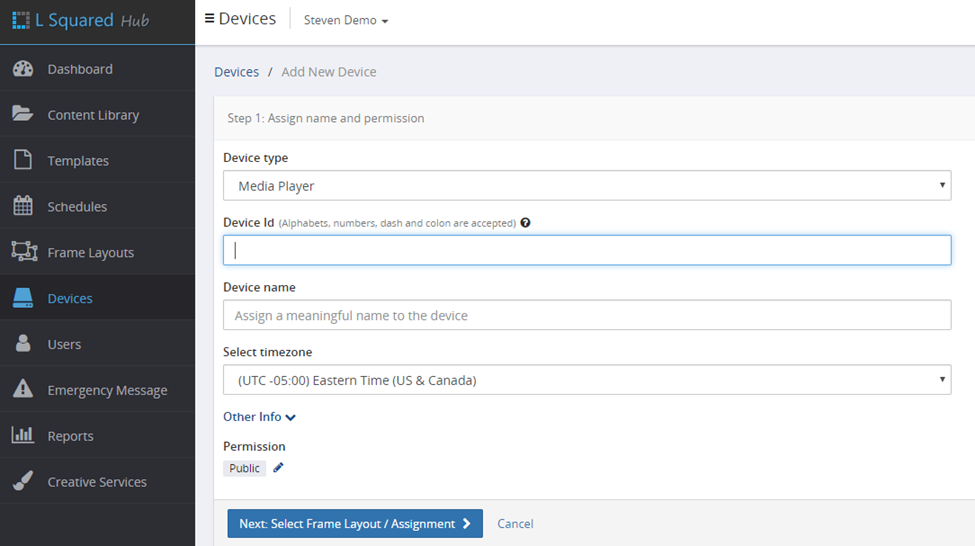
- Locate and click on 'Add New Device' to initiate the device registration process.

Step 4: Enter Device Information
- Enter the 'Device ID' obtained in Step 1 into the provided field.
- Assign a name to the device for easy identification.
- Specify the device's time zone to ensure accurate scheduling.
- Once all information is entered, proceed to the next step by clicking on the blue button labeled 'Next: Select frame Layout / Assignment'.
Step 5: Select Frame Layout
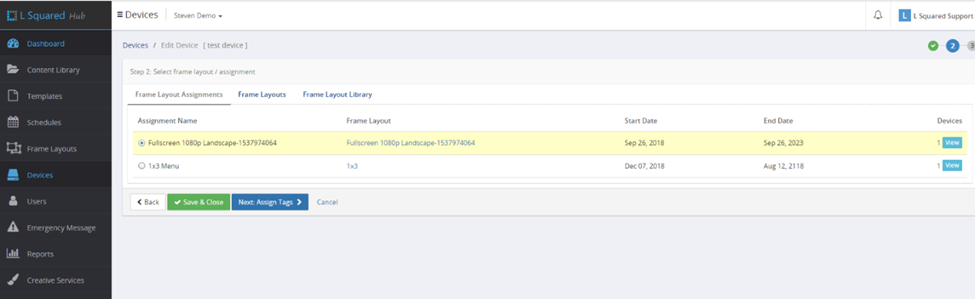
- In this step, choose the specified frame layout you want to assign to the device.
- After selecting the layout, click on 'Save and Close'.
Step 6: Device Registration Confirmation
- You will be directed to the Devices page, where you will now see the newly added device.
- This confirms that the device has been successfully registered and is now ready for contents to be uploaded and scheduled for digital signage.
By following these steps, you should be able to register your device for digital signage implementation using the L Squared Application. Make sure to consult the L Squared Knowledge Base for any specific installation instructions or troubleshooting information related to your TV model.